
In Workflow Designer, you can configure the entities section that will be presented on the launch form. By default, new workflow configurations have this section is added to the top of the form. You can manually add the entity question to your existing workflow configurations. You must then choose a relationship type and map the entity properties to properties in the workflow. This ensures that the data is correctly synced across Ironclad.
Entities are not supported in sandbox mode.
Use Case
Classics Inc. is updating an existing contract approval workflow to capture more detailed counterparty information. Using Workflow Designer, the team adds an entity question to the launch form of the workflow. They select the appropriate relationship type, such as Vendor, and map the relevant entity properties—like address, contact, and business unit—to properties in the workflow configuration.
Permissions
| Features | Workflow Designer, Entities |
| Permissions | Admin role OR Repository and Entities = View, edit, and create access to all Record types and Entity types (current and future) AND Workflow Designer = Ability to create and edit all workflow configurations |
Best Practice: Once you have customized the entities section, we recommend walking through Use Entities in Workflows. This article will walk you through how to use entities on launch forms.
Customize Entity Launch Form Section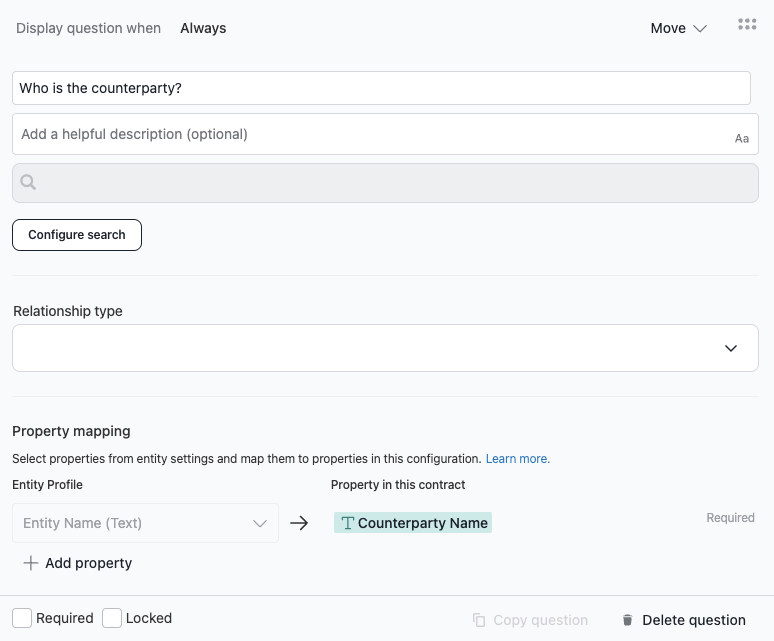
- Click on the Workflow Designer tab and select the workflow configuration you want to modify. Click on the Create tab.
- Locate and click on the entity launch form question. By default, the question is ‘who is the counterparty’.
- Use conditions to define when the question displays. By default, the question Always appears on the launch form.
- Edit the question and description.
- In the Relationship Type dropdown, you can select which types of entities can be used on the launch form.
-
Map the entity properties to properties in the contract. You can also add and remove properties from the workflow configuration.
Note: When you map an entity property (e.g., Entity address) to a contract property (e.g., Counterparty address), the question that related to the contract property will automatically populate with entity information if an entity is selected. Users viewing the form question for the mapped entity (ie. What is the counterparty address) will see an indication showing that the field is being populated from the entity. For those questions, you cannot use formulas or different default values.
- While you can lock the entity question or mark it as required, we generally don't recommend either option. These restrictions may cause problems when dealing with counterparties that aren't entities.
- Click Save and Publish.
Resources
Explore articles, courses, and support options to get the most out of Ironclad.