
Per-Tenant Encryption is a security model used by Ironclad to protect customer documents. Each Ironclad tenant’s data is encrypted with a unique encryption key. Only that tenant’s key can decrypt their documents, reducing the risk of unauthorized access and strengthening privacy and compliance.
Ironclad Encryption Management Options
Note: Ironclad only encrypts documents (.docx and .pdf) stored and managed within Ironclad, and no other data.
Per-Tenant Encryption Features
Per-tenant encryption allows you to encrypt your contract data inside Ironclad using an encryption key.
We support the following key management options:
- Key managed by Ironclad (Default)
- Hold your own key (HYOK): Configure a key that is stored with a cloud provider.
- For HYOK, we support the following cloud provider(s):
- Google Cloud Platform (GCP)
- Coming Soon: Amazon Web Services (AWS)
- For HYOK, we support the following cloud provider(s):
Warning: Once the per-tenant encryption feature is turned on, it cannot be turned off.
Features
- You can rotate your root keys on demand.
- You can transparently migrate between all key management options.
- You will lose access to your workflow data in any of the following scenarios:
- HYOK:
- If you delete the root key.
- If you revoke access to the root key.
- HYOK:
Limitations
- This feature only supports documents stored on in progress workflows in Ironclad.
- HYOK supported key material should be at least 256 bytes.
Warning: Please contact the Ironclad support team if you lose data access or need additional assistance.
When should you HYOK?
With HYOK, you will have the ability to have a unique root encryption key for their organization, bring your own encryption key, and rotate the key as needed. In addition, you get to hold and store the root key in your own public cloud environment.
HYOK may be a good fit if any of the following apply:
- You want direct control of the root encryption key and your data.
- You store contracts containing very sensitive information.
- You operate in a highly regulated industry.
- You (or your counterparties) are government contractors.
- Your entities require stronger security.
What are the benefits of BYOK?
- Key Ownership: With BYOK, your organization retains ownership of the encryption keys. This means you are responsible for generating, storing, and managing the keys, as well as controlling access to them.
- Third-Party Cloud Services: BYOK is typically used in conjunction with cloud services provided by external vendors. These cloud services may include data storage, database services, file sharing, and more.
- Enhanced Security: BYOK is often adopted by organizations that require a higher level of control and security over their data. It allows them to ensure that data is encrypted with keys they control, reducing the risk of unauthorized access or data breaches.
- Data Security: With BYOK, your data is encrypted using your keys before it is sent to the cloud service provider's servers. This means that the cloud provider cannot access the plaintext data without your keys.
- Regulatory Compliance: BYOK can help you comply with regulatory requirements related to data protection and privacy. It provides a way to demonstrate control over encryption keys, which is often a requirement in various data protection regulations.
- Key Rotation: You can manage key rotation and lifecycle management as per their security policies. You can rotate keys periodically to enhance security.
- Data Portability: BYOK can facilitate data portability. If you decide to move data from one cloud service provider to another, you can take your encryption keys with you, ensuring you can decrypt your data in the new environment.
Set Up Standard Encryption
-
Toggle Enable per-tenant encryption under Company Settings > Settings > Security and Data.
- You will be asked, Where do you want to keep your data encryption root key? Select between:
- I want Ironclad to hold a key to encrypt my company's data.
-
I want to configure my own externally-held key.
- Select I want Ironclad to hold a key to encrypt my company's data.
- Click Next.
-
Click Apply.
The key used to encrypt your workflow documents should be held by Ironclad.
Set Up HYOK (Google Cloud Key Management)
To set up per-tenant encryption for Google Cloud (GCP):
-
Toggle on Enable per-tenant encryption under Company Settings > Settings > Security and Data.
-
When asked, Where do you want to keep your data encryption root key? Select I want to configure my own externally-held key.
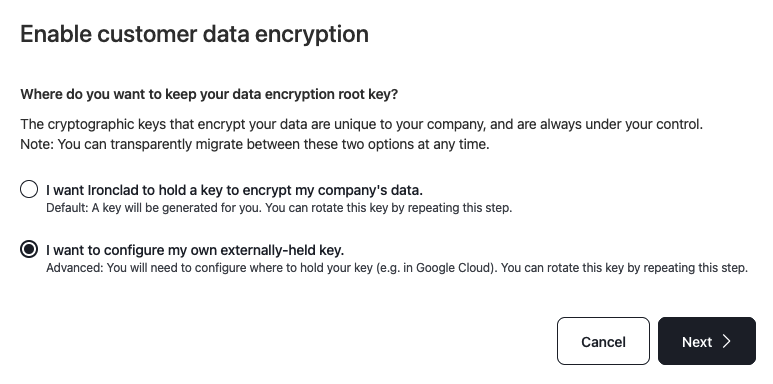
- Click Next.
- Under Where do you hold your root key?, Select Google Cloud Key Management.
- Click Next.
- Then select Guide me through creating a new key for wrapping.
- Click Next to view and copy the configuration code that you'll run on the GCP cloud shell.
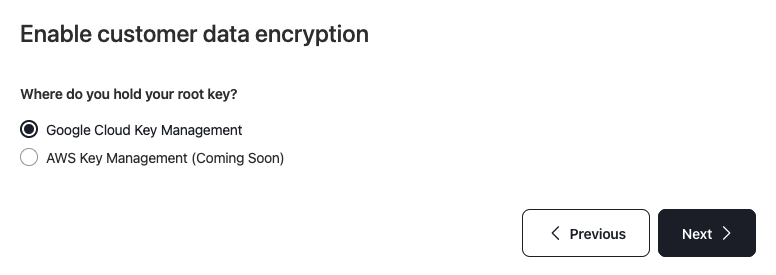
- Use the code snippets in the product.
- Copy the ARN string, paste it into Finish GCP onboarding by providing the following key configuration information field.
-
Click Apply.
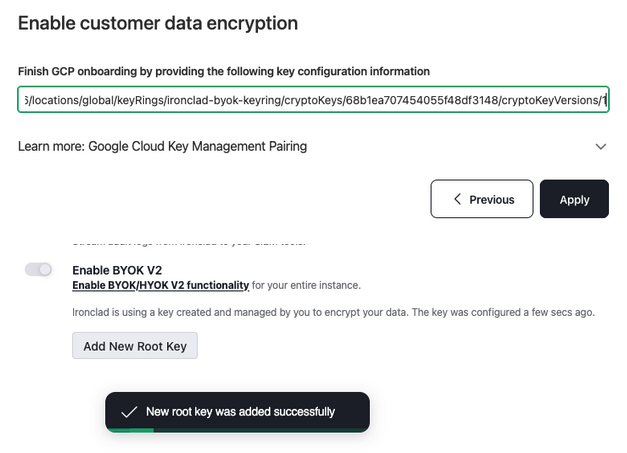
You'll see a notification letting you know that your new root key was added successful.
Set Up HYOK (AWS Key Management)
To set up per-tenant encryption for AWS:
-
Toggle on Enable per-tenant encryption under Company Settings > Settings > Security and Data.
-
When asked, Where do you want to keep your data encryption root key? Select I want to configure my own externally-held key.
- Click Next.
- Under Where do you hold your root key?, Select AWS Key Management.
- Click Next.
- Under Set up your root key with AWS Key Management, select I have an existing root key I wish to use for wrapping.
- Note: You have the option to select Guide me through creating a new key for wrapping at this step.
- Click Next to view and copy the configuration code that you'll run on the AWS cloud shell.
- Follow the instructions provided under Grant permissions to Ironclad to use the root key.
- Click Next.
- Copy the ARN string, and paste it into Finish AWS onboarding by providing the following key configuration information field.
-
Click Apply.
You'll see a notification letting you know that your new root key was added successful.
FAQs
Q: Which cloud environments does Hold Your Own Key (HYOK) support?
A: We support HYOK in Google Cloud Platforms (GCP), and will support HYOK in Amazon Web Services (AWS) in the future.
Q: Is HYOK available in the EU region?
A: Yes.
Q: What kind of data is encrypted?
A: Contracts that are stored in in-flight workflows are encrypted.
Q: Can Ironclad encrypt all types of customer data?
A: At this time, we can only encrypt contract documents.
Q: Is it possible to recover data if a customer loses HYOK key configuration?
A: We rely on the availability of the key configured by a customer, and losing it would make the data unencryptable.
Resources
Explore articles, courses, and support options to get the most out of Ironclad.
Help Center
Support