
Summary
This article walks you through how to add existing Ironclad users to another instance of Ironclad.
Use Case
At Classics Inc., a legal operations manager needs to give an employee who already uses Ironclad in one business unit access to another Ironclad instance. The admin goes to Company Settings > Users, sends an invitation to that existing user, and the user accepts the invite to join the additional instance. This lets Classics Inc. give shared team members access to multiple Ironclad instances.
Permissions
| Features | Company Settings |
| Permissions | Admin role OR Users & Groups Administration = Yes |
Add Users to Another Instance of Ironclad
You can add users to an Ironclad instance, even if they already exist in another Ironclad instance. Previously, you needed to reach out to Support to do this. You can now do this independently.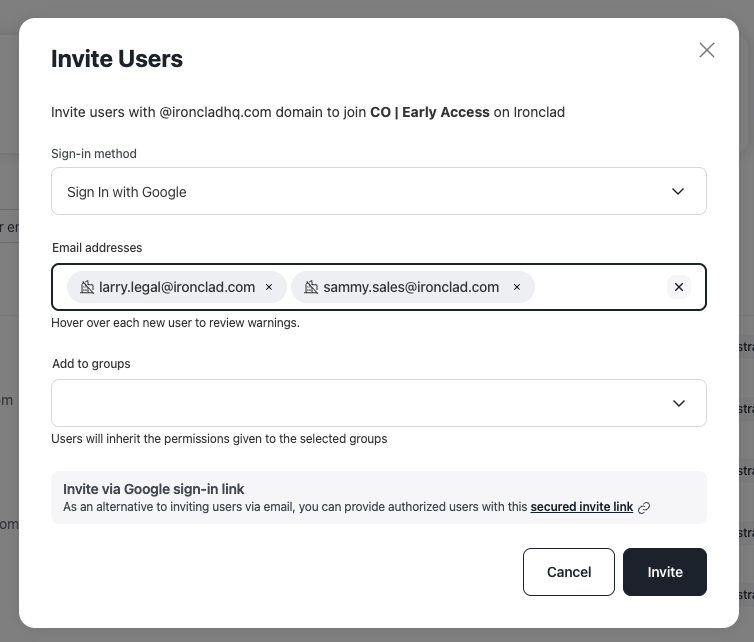
- Click on your profile icon located in the top right corner of Ironclad. Navigate to Company Settings > Users.
- Click Invite User.
- An invite is emailed to the user. The user must accept the invite to gain access to the Ironclad instance.
Resources
Explore articles, courses, and support options to get the most out of Ironclad.
Help Center
- No relevant resources at this time.
Academy
- No relevant resources at this time.